- MovieSlate App
- MovieSlate Cloud
- KeyClips
- Videos
- Testimonials
- Press
- Accessories
- Support


Back
Frequently Asked Questions
We know you have them, here are answers to the common ones.
Our crew can't get our iPads/iPhones to sync with each other on our studio's locked-down Wi-Fi network. One device never shows the others, and the 'Choose Remote Control' option never appears. What do we need our IT or Wi-Fi people to change?Why this happens On a locked-down studio, corporate, or facility Wi-Fi, MovieSlate's automatic peer discovery (Bonjour / mDNS networking services) is usually what gets blocked. The fastest fix is almost always to use MovieSlate's new Connect by IP Address feature (available in MovieSlate 8 version 26.0 or newer), which lets iPads/iPhones connect directly even when Bonjour is unreachable. Fastest fix: Connect by IP Address (bypasses Bonjour entirely) Requires MovieSlate 8 version 26.0 or newer on every device. On the client iPad/iPhone (the one that needs to see the host), open MovieSlate's device chooser. There are several ways to get there; the most common is from the timecode display:
Once the chooser is open:
The chooser also keeps a Recently Seen list, so once two devices have connected once, you can usually re-pair from that list later without re-entering the IP. Confirm the basics on every device
Connect-by-IP gets you working immediately, but if you'd like your IT or Wi-Fi team to enable automatic peer discovery (so the chooser's Online list populates on its own), MovieSlate uses two discovery mechanisms in parallel: Bonjour / mDNS and a supplementary UDP probe protocol. The ports involved are: Always-works fallback
Many studio and corporate networks place every device on an isolated "client" segment (sometimes called client isolation, AP isolation, or a "dedicated" segment) that prevents devices on the same Wi-Fi from talking to each other at all — even when Bonjour and UDP ports are technically open. If you hit this, ask the Wi-Fi team to either:
Even if your IT team can't (or won't) change anything on the network, the Connect by IP Address… route will work as long as the iPads/iPhones can reach each other on the network at all — which is almost always the case once they're on the same Wi-Fi, regardless of how locked-down it is. After connecting (automatically or by IP), return to Settings > TextField Data Sync & Remote Control — the other devices and the Choose Remote Control option should now appear. |
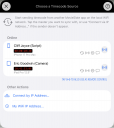
| One of many FAQs offered. |
|
Social
Follow @MovieSlate

|
|||||||

Copyright © 2009-26 PureBlend Corp. All rights reserved. MovieSlate®, Movie★Slate® and KeyClips® are registered trademarks of PureBlend Corp. | Privacy Policy | Terms of Use | Credits