- MovieSlate App
- MovieSlate Cloud
- KeyClips
- Videos
- Testimonials
- Press
- Accessories
- Support


Sound Department Pro Feature
If you make a living recording sound, this feature could easily save you hours of work each week.
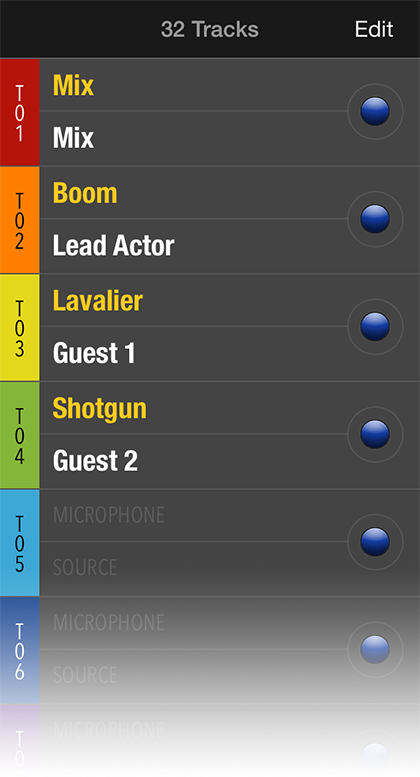
Optimized Workflow.
Specifically designed for a Sound Mixer’s workflow, the Sound Department Pro feature includes a new “Sound Dept” screen for smart logging of sound meta data.Rapid Data Entry.
Easily manage meta data such as sound: roll, folder, media, filetype, sample rate, bit rate, ref tone, recorder filename(s)— and up to 48 tracks (each containing fields for microphone and actor names). To enable/disable a track, simply tap its large round gray/blue button.Sound Recorder Sync
 Sync metadata, timecode, and transport controls between MovieSlate 8 and Sound Devices 6-series recorder/mixers.
Learn More
Sync metadata, timecode, and transport controls between MovieSlate 8 and Sound Devices 6-series recorder/mixers.
Learn More
Stunning Reports.
Get rave reviews from post production with MovieSlate’s comprehensive Sound Report. Intended for computer web browser viewing, Sound Reports can be printed, or saved as a PDF file (on Macs, or with Adobe Acrobat on Windows). Download a sample Sound Report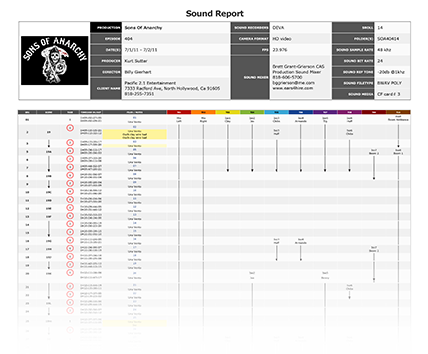
Huge time saver.
Professional Sound Mixers are enthusiastic about MovieSlate’s optional Sound Department Pro feature— making it trivially easy to capture sound department log data and quickly generate daily Sound Reports for use by post production.Click to play
Sound Dept Features
- Optimized for, and designed by, professional Sound Mixers
- Fast and easy to use
- Supports from 4 to 48 sound tracks
- Enable/disable sound tracks with a single tap
- Customizable text snippets for all fields and sound tracks
- Customizable field labels for all fields and sound tracks
- Works on iPad, iPhone, iPod touch
- Now includes Timecode Sync Pro Feature!
Sound Report Features
- Run a report for a Project, Sound Roll, or Date
- Report header includes mixer, project, client, recorder, audio info
- Can include a custom production logo graphic
- Report rows can optionally include roll, scene, take, timecode, notes, tracks, ratings
- Viewable on any web browser (works best in Safari and Firefox)
|
Social
Follow @MovieSlate

|
|||||||

Copyright © 2009-26 PureBlend Corp. All rights reserved. MovieSlate®, Movie★Slate® and KeyClips® are registered trademarks of PureBlend Corp. | Privacy Policy | Terms of Use | Credits