- MovieSlate App
- MovieSlate Cloud
- KeyClips
- Videos
- Testimonials
- Press
- Accessories
- Support


Timecode Sync Pro Feature
Receive timecode from, and send timecode to cameras, sound recorders, and timecode generators.
Click to play
How reliable is the jam-sync?
When cable-connected to an external timecode source, MovieSlate does not drift. When jam-synced, under ideal conditions MovieSlate 4.0 should drift about 1 frame over 24 hours. The iPad/iPhone/iPod Touch does not contain a high accuracy time crystal like a camera, sound recorder, or timecode generator. If you're still finding drift that exceeds that required for your workflow there are some alternatives:- Jam-sync more frequently.
- Use another iDevice that is tethered to an LTC generator and then have MovieSlate send timecode over WiFi to your working iDevice.
- Use a Timecode Systems hub or portable (high-quality) LTC generator that can remain connected to MovieSlate.
Frame-accurate wireless syncing
When WiFi synced with a Timecode Systems hub (Buddy:wifi master, :pulse, or :wave), MovieSlate displays the same timecode as seen on the TCB. The TCB timecode generator accuracy is 0.2 ppm TCXO reference oscillator (less than one half frame drift a day). Learn moreOn-set Chat.
Chat with other MovieSlates on the local WiFi network; no internet connection necessary. Chat with everyone on set and at the same time have a separate chat session with just a single person or a subset of your crew.Timecode Sync Features
- Send/Receive LTC timecode via iOS device’s headphone jack
- Works with supported cameras, sound recorders, and TC generators
- Supported frame rates: 23.976, 24, 25, 29.97 DF, 29.97 NDF, 30 DF, 30 NDF
- Can auto start/shot MovieSlate shots when camera starts/stops
- Try before you buy— from MovieSlate’s Settings > Timecode Syncing
- WiFi syncs timecode with other MovieSlates (iOS devices)
- WiFi syncs timecode with Timecode Systems Buddy:wifi master, :pulse, & :wave units
Receive timecode.
Connect a compatible audio cable from an LTC timecode source to the headphone jack of your iPad, iPhone, or iPod touch. Once MovieSlate has detected the external timecode, the cable can be disconnected, and timecode is “jam synced”. Compatible cables Compatible cameras Download Timecode SampleSend timecode.
Use your iPad, iPhone, or iPod touch as a timecode generator. Run a standard audio cable between MovieSlate and your compatible camera or other external timecode device.WiFi Sync with Timecode Systems hubs.
With the Timecode Sync Pro feature, MovieSlate users can enjoy SMPTE timecode that’s synched over WiFi in real time from the extremely accurate Timecode Systems hub. Hub settings, timecode, userbits, and framerate can all be changed directly from MovieSlate (after entering the 4 digit password). Learn more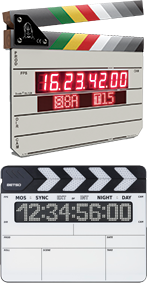 WiFi Sync with Wireless Timecode Slates.
MovieSlate now supports the WiFi Sync with other MovieSlates.
Send timecode and data via WiFi from one iOS device running MovieSlate to another.Remotely control MovieSlate iPads.
Using a WiFi sync connection, remotely trigger an iPad’s MovieSlate clap from another iOS device running MovieSlate.Jam timecode and userbits.
Easily “jam” (manually set) the timecode and the userbits display using MovieSlate’s optimized keypad— to enter new values, or to display clock time-of-day.Bluetooth Sync.
Sync MovieSlate with the Tentacle Sync E and Timecode Systems UltraSync Blue.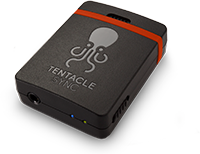 Browse available Tentacle Sync E devices from within MovieSlate, you can see signal strength, battery levels, timecode, and frame rate.
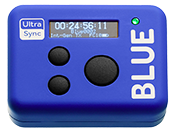 The UltraSync Blue pairs with up to four devices simultaneously, keeping them all in sync. Integrates with the rest of the Timecode Systems wireless timecode products over RF.
AtomX SYNC module for Ninja V.
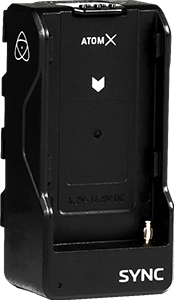 Sync MovieSlate with your Atomos Ninja V!
Communicating over Bluetooth LE, the AtomX SYNC module can pair up to 6 devices at once. Bring professional wireless timecode sync to your HDMI capable camera for perfect sync everytime.
Sync MovieSlate with your Atomos Ninja V!
Communicating over Bluetooth LE, the AtomX SYNC module can pair up to 6 devices at once. Bring professional wireless timecode sync to your HDMI capable camera for perfect sync everytime.
|
Social
Follow @MovieSlate

|
|||||||

Copyright © 2009-26 PureBlend Corp. All rights reserved. MovieSlate®, Movie★Slate® and KeyClips® are registered trademarks of PureBlend Corp. | Privacy Policy | Terms of Use | Credits