- MovieSlate App
- MovieSlate Cloud
- KeyClips
- Videos
- Testimonials
- Press
- Accessories
- Support

Timecode Cables & Adapters
For use with MovieSlate’s optional Timecode Sync Plugin.
Apple Headphone Jack Adapters.
Some newer iOS devices lack a headphone jack, so Apple sells Lightning and USB-C adapters which will allow your iOS device to accept TRS and TRRS headphone cables.Apple Lightning to 3.5 mm Headphone Jack Adapter
If your iOS device has a Lightning port, and lacks a headphone jack (or its headphone jack is non-functional), then you can use Apple’s adapter to connect most TRS and TRRS headphone cables to your iOS device’s Lightning port. More InfoUSB-C Compatible Cables/Adapters.
Recommended (most reliable on iOS 18 / iOS 26):
Class-compliant USB-C audio interfaces. These bypass the TRRS-detection requirement entirely — iOS recognizes them automatically and routes audio in and out. No special cable required, and they give you a hardware gain control to avoid clipping. We have tested with these interfaces:
• RØDE AI-Micro
Pocket-sized, compact audio interface with auto-sensing TRS/TRRS input. (The AI-Micro’s gain control doesn’t function here but MovieSlate does work with this interface. You might see “Too Loud” messages when testing the sync.) More Info• Zoom AMS-22
Compact audio interface with XLR/TRS input 2-in, 2-out. More Info• IK Multimedia iRig Pro Duo I/O
Compact audio interface, pro-level with XLR, mic & line-level inputs and phantom power. More InfoStill works (TRRS adapter path):
- Tentacle Sync: Tentacle to TRRS (iPhone Sync) Cable, model C12 (requires the Apple USB-C to 3.5mm Headphone Jack Adapter or the RØDE AI-Micro interface) More Info
- Cubilux TRS Line to Microphone Attenuator Cable More Info
- Movo MC3 TRS to TRRS Microphone Adapter More Info
- For other generator brands (Denecke, Ambient, Mozegear, Horita), use a generator-specific TRRS cable or custom-wire one with the signal on the mic-ring conductor
Apple USB-C to 3.5 mm Headphone Jack Adapter
This Apple adapter and the use of a proper TRRS cable that places the timecode signal on the mic ring (not the headphone tip). The cable must be designed for iPhone/iPad timecode input. Some examples:No longer recommended on iOS 18 and newer:
Generic / no-brand USB-C audio adapters that we may have previously recommended (e.g. UWECAN, SYIHLON). iOS now classifies non-MFi (“Made for iPhone/iPod/iPad”) adapters as port type "Other" and won’t route audio through them. We retested in June 2026 and none of these now work for LTC IN.
⚠ iOS 18 and iOS 26 update (June 2026):
Since the 2025 release of iOS 26 Apple has tightened how iOS detects external audio inputs. Many cable and adapter combinations that worked on earlier iOS versions no longer pass timecode through to MovieSlate. If your timecode signal-strength meter sits at 0% even with the audio plugged in, see the updated recommendations on this page.Cables for sending timecode.
When sending timecode from MovieSlate, use a standard, unattenuated cable— which you can purchase just about anywhere.Cables for receiving timecode.
When receiving timecode in MovieSlate, use a custom, attenuated cable as described below. Below are the three variables to take into account for the receiving cable:Headphone jack at the iOS end of the cable
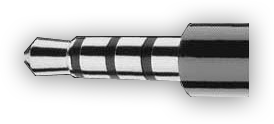 On the Apple iOS device end of the cable, this jack must be one with four distinct silver bands (as pictured at right).
Without those four bands, an iPad/iPhone/iPod touch won't be able to accept audio input.
On the Apple iOS device end of the cable, this jack must be one with four distinct silver bands (as pictured at right).
Without those four bands, an iPad/iPhone/iPod touch won't be able to accept audio input.
Denecke has also posted a PDF with the specifications for connecting LTC devices to the iPhone / iPad / iPod Touch.
Jack at other end of the cable
This jack must fit the sound source (such as your TC generator or sound recorder). Your sound source’s manual is a good place to find the type of plug required. Failing that, you could Google for that information.Padding & attenuation (older iOS guidance)
Earlier versions of iOS were more forgiving, a passive resistor pad inline with a TRS cable would attenuate a hot LINE-level signal to MIC level. On iOS 18 and iOS 26, this approach is risky: the inline pad can change the impedance presented to the adapter’s mic ring and prevent iOS from detecting the adapter at all.What works in 2026 and beyond
Tentacle Sync’s iPhone TRRS cable already includes attenuation tuned to keep iOS’s mic detection happy. Use it as is: no additional padding. With a USB-C audio interface (RØDE AI-Micro, Zoom AMS-22, etc.), use its hardware gain control to set the input level. No cable padding required. Some clipping at the input is acceptable. MovieSlate 8.9.57+ filters out the resulting drop-frame-flag bit-flips automatically.Gotham Sound Timecode Roll Cable
Gotham Sound’s cable automatically rolls MovieSlate (and logs proper timecode) whenever the Sound Devices 788T rolls and cuts.https://www.gothamsound.com/library/hack-time-code
Wireless Solutions.
Many MovieSlate users have reported success sending and receiving timecode audio wirelessly using transmitters and receivers like those from Comtek. A common workflow is to cable-connect the LTC output from a sound recorder to a wireless transmitter. Then cable-connect a wireless receiver to the iOS device(s) running MovieSlate.|
Social
Follow @MovieSlate

|
|||||||

Copyright © 2009-26 PureBlend Corp. All rights reserved. MovieSlate®, Movie★Slate® and KeyClips® are registered trademarks of PureBlend Corp. | Privacy Policy | Terms of Use | Credits